Notifications and Discord
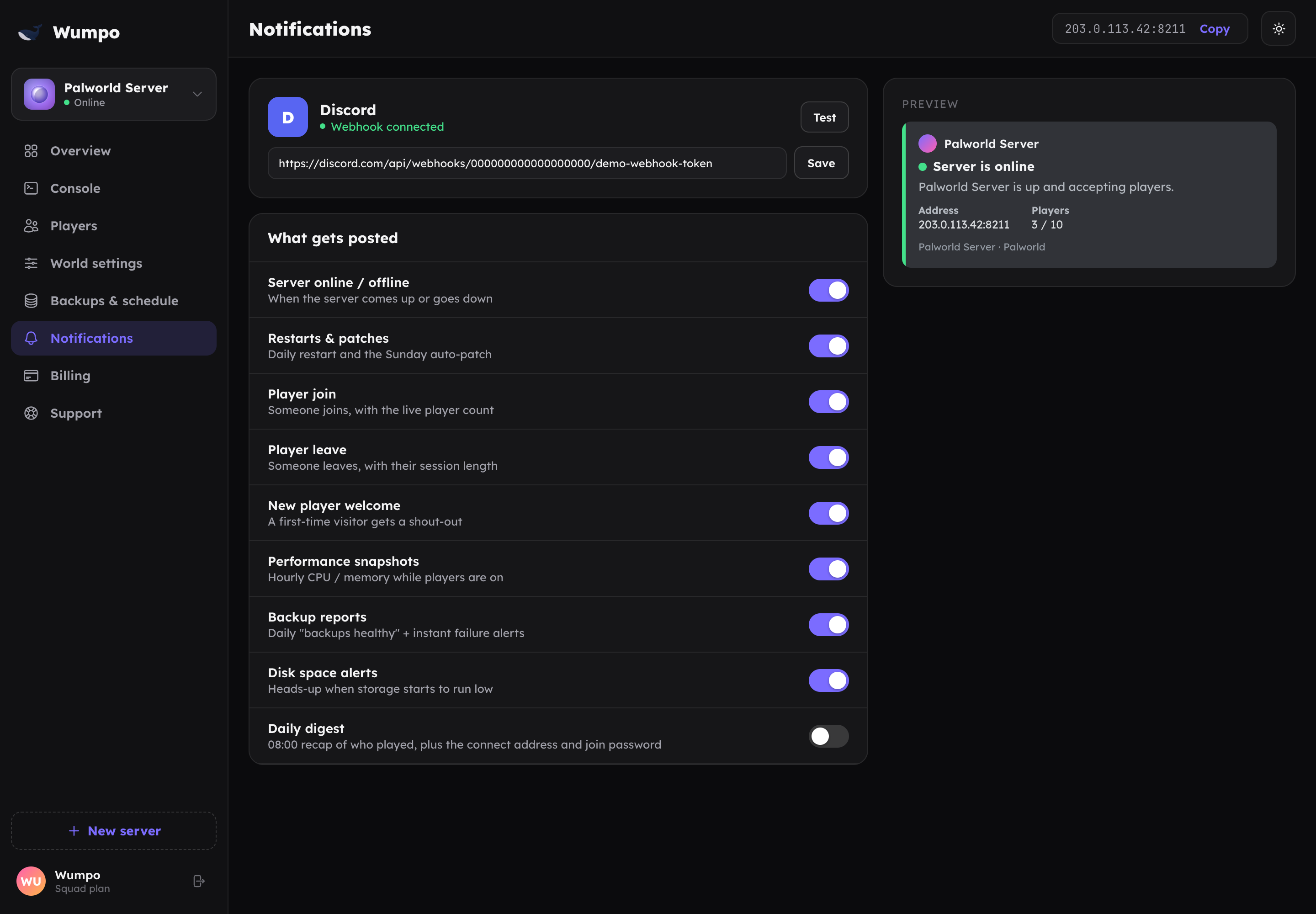
Wumpo can send updates about your server straight to a Discord channel: who joined, how it is performing, and when backups run. You set it up once on the Notifications panel.
Connecting Discord
- In Discord, create a webhook for the channel you want the updates in (Channel settings, then Integrations, then Webhooks). Copy its URL.
- In the Wumpo dashboard, open the Notifications panel for your server.
- Paste the webhook URL and save.
That is it. Wumpo will start posting updates to that channel. There is a full step-by-step version, with what a webhook is and where to find it, on Discord integration.
Choosing what you get
You can turn individual alerts on or off, so you only get what you care about. Typical updates include:
- Player join and leave pings.
- Performance snapshots, a periodic health check.
- Backup reports, so you know saves are happening.
- Restart and update heads-up, so nobody is caught out.
Turning it off
Remove the webhook URL from the Notifications panel to stop all Discord updates. You can add it back at any time.
Privacy
The webhook only posts to the channel you chose. You are in control: pick a private channel if you only want your squad to see the updates.