Discord integration
Wumpo can post server updates straight into a Discord channel: who joined, how the server is doing, and when backups run. This page is the full step-by-step setup. For the shorter version and the list of alert types, see Notifications and Discord.
What you need
- A Discord server where you can manage a channel (you need the Manage Webhooks permission).
- Your Wumpo dashboard open, on the server you want alerts for.
Step 1: Create a Discord webhook
A webhook is a private address Discord gives you that lets an app post messages to one specific channel. To create one:
- In Discord, open the channel you want the updates in.
- Open Edit Channel, then Integrations, then Webhooks.
- Choose New Webhook. Give it a name like "Wumpo" and, if you like, a picture.
- Choose Copy Webhook URL.
Keep that URL private. Anyone who has it can post to your channel, so treat it like a key.
Step 2: Add it to Wumpo
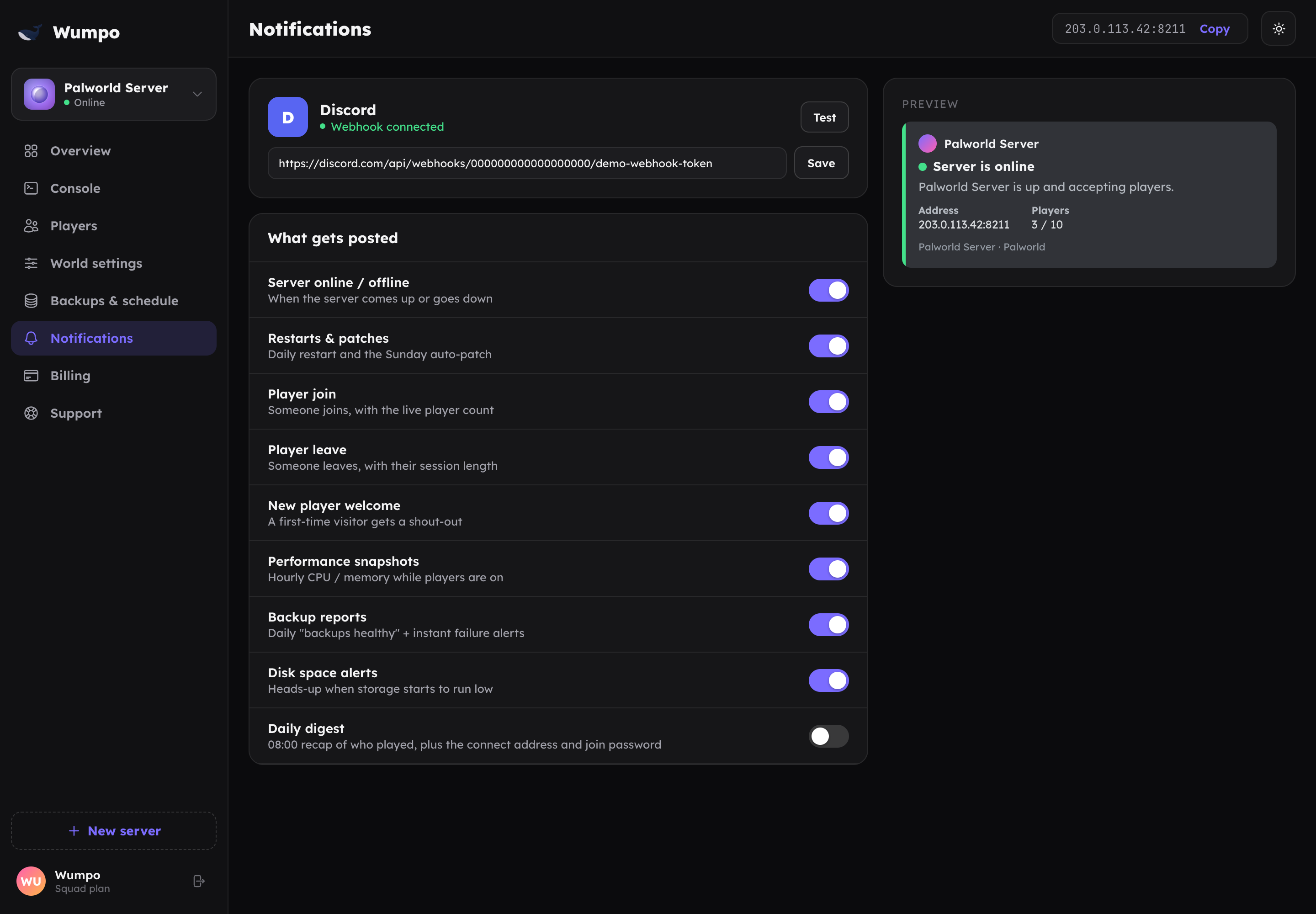
- In the Wumpo dashboard, open the Notifications panel for your server.
- Paste the webhook URL into the field.
- Save.
Wumpo will begin posting updates to that channel.
Step 3: Choose your alerts
Turn individual alerts on or off so you only get what you want. Options include player join and leave pings, performance snapshots, backup reports, and restart or update heads-ups.
Turning it off
To stop the updates, remove the webhook URL from the Notifications panel and save. You can add it back at any time. To change which channel gets the updates, create a webhook in the new channel and paste that URL instead.
Troubleshooting
- No messages appearing? Check the webhook URL was pasted in full, and that the webhook still exists in Discord (deleting it in Discord stops the posts).
- Wrong channel? The webhook always posts to the channel it was created in. Make a new webhook in the right channel and use that URL.
- Too many messages? Turn off the alert types you do not need on the Notifications panel.