
Your dashboard
The dashboard is where you run everything. Sign in at wumpo.cloud and open a server to see it. If you have more than one server, use the switcher at the top to move between them.
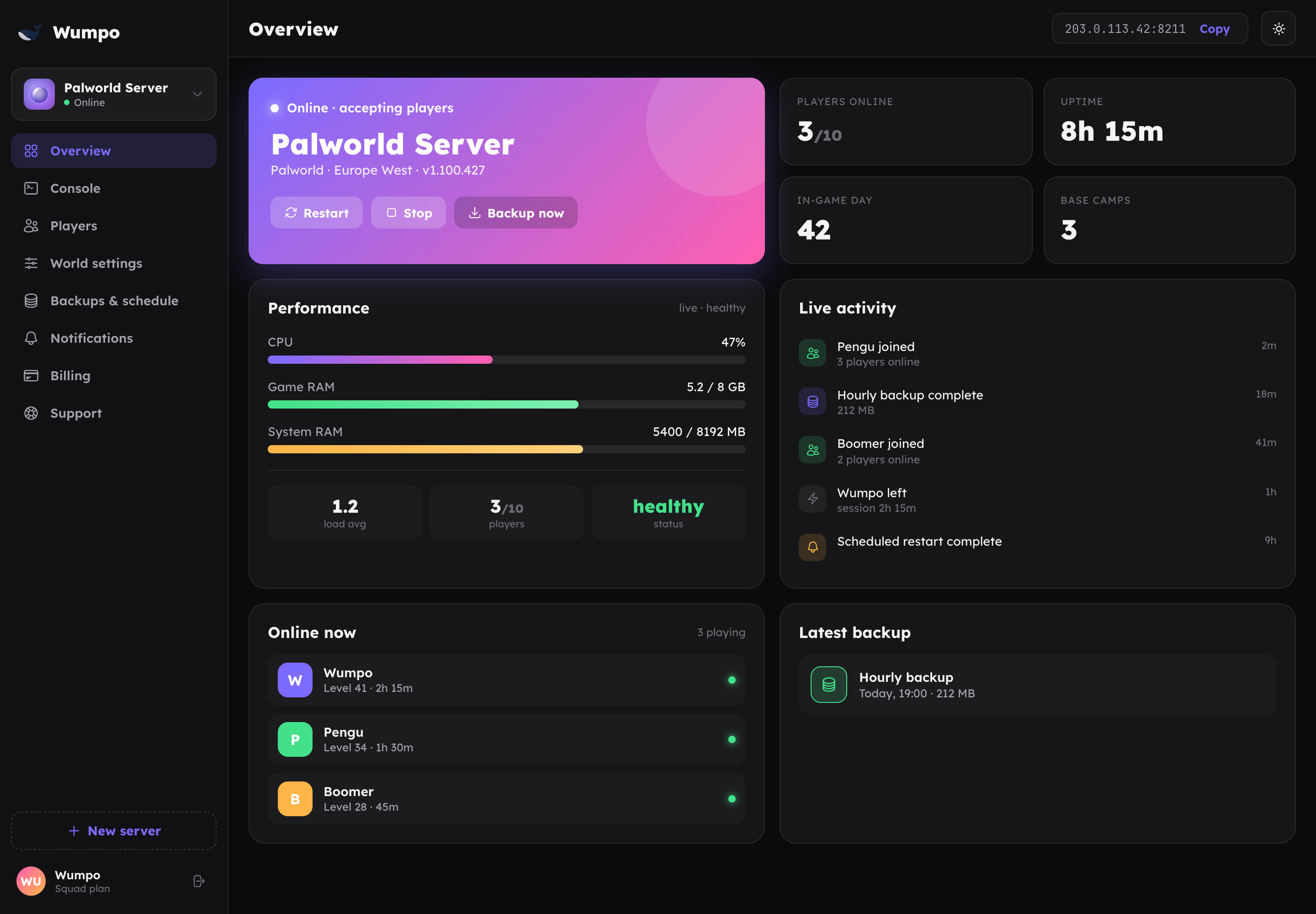
The panels
Each server has a set of panels down the side (along the bottom on mobile):
- Overview shows live status: whether the server is online, how many players are on, and performance at a glance. Start, stop and restart from here.
- Console is a live view of the server log, with a command box for supported commands.
- Players lists who is on and who has visited, with kick and ban controls.
- World settings lets you change the game rules: difficulty, rates, player limits and more, tailored to your game.
- Backups lists your saves and lets you restore any of them with one click.
- Notifications is where you connect Discord and choose which alerts you want.
- Billing shows your plan, invoices and your Wumpo Points balance.
- Support is a shortcut to raise a ticket if you need a hand.
Live by default
The dashboard updates itself. When a player joins, a backup finishes, or the server restarts, you see it without refreshing the page. Actions you take (like a restart) show their progress and then settle to the real state reported by the server.
Light or dark
Use the theme toggle to switch between light and dark. Your choice is remembered on your device.
Next steps
- New here? Start with Deploy your first server.
- Ready to tune your world? See World settings.
- Want alerts in Discord? See Notifications and Discord.