
Palworld
Palworld is live on Wumpo. Deploy a dedicated Palworld server, invite your squad, and tune the world to play your way.
Deploying
Follow Deploy your first server and pick Palworld. Choose a plan based on how many people will play and how much base building you plan to do (bigger bases mean more to simulate, so larger plans handle busy guilds better).
Presets
When you deploy, you pick a preset as a starting point. You can change any of it later in World settings.
- Chill. Cranked XP and gather rates, no death penalty. Just vibes and building.
- Normal. Default balance, the way the game is meant to be played.
- Hardcore. Slow XP, full death penalty, tougher fights. For the sickos.
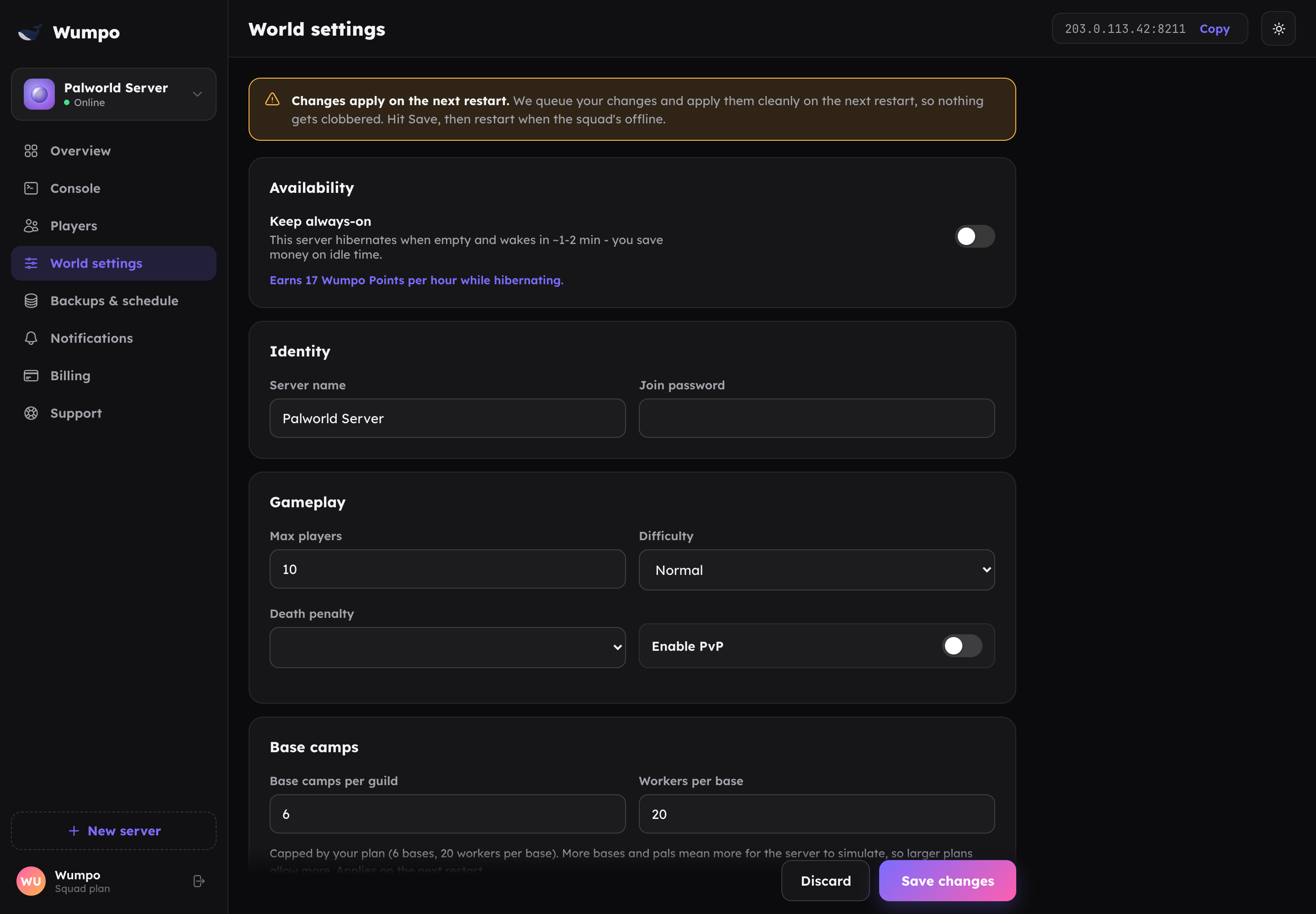
Settings you can change
From the World settings panel you can adjust the Palworld rules, including:
- Difficulty: Casual, Normal or Hard.
- Death penalty: how much you drop when you die.
- XP, gather, breeding and other rates.
- Max players, up to your plan's limit.
- Server name and join password.
Changes apply on the next restart. The dashboard will offer to restart when you save.
Base camp and player limits by plan
Bases and the pals working them drive most of the simulation load, so the caps scale with your plan. See Plan specifications for the safe default bases-per-guild, pals-per-base and player-limit numbers for Outpost, Ridge, Squad and Colony. If you are running a large guild with lots of bases, the Colony plan gives you the most headroom.
A note on accuracy: several independent Palworld hosting providers report that dedicated servers can ignore base-camp settings above the game's own built-in default, regardless of what a config file asks for. We have not yet confirmed in-game whether Wumpo servers are affected. Player limits are not affected by this - only the bases-per-guild and pals-per-base numbers. We'll update this page with a confirmed answer soon.
Performance headroom (optional)
Every plan's numbers above are deliberately conservative safe defaults. In World settings, two switches under Performance headroom let you opt into higher limits for a single server:
| Plan | Players | Bases per guild | Pals per base |
|---|---|---|---|
| Outpost | Up to 10 | 6 | 22 |
| Ridge | Up to 12 | 7 | 24 |
| Squad | Up to 16 | 7 | 24 |
| Colony | Up to 32 | 10 | 30 |
These higher numbers are based on research into Palworld's own performance behaviour plus real usage on Wumpo, not a lab-verified benchmark for every world and preset combination. Turning a switch on is a genuine trade: more headroom, at a real chance of lag under heavy load (lots of players moving and fighting at once, or a huge, busy base). If you turn a switch off again, anything above the safe number is brought back down automatically. Watch how your server performs after turning one on, and dial it back if things feel sluggish.
The player-count switch is unaffected by the accuracy note above and works as described. The bases-per-guild and pals-per-base switch is not yet confirmed to change anything above the game's own built-in limit on a dedicated server - see the note under Base camp limits.
Cross-platform play
Palworld servers on Wumpo can be played by Steam, Xbox, PlayStation 5, Mac and Game Pass players together in one world. New servers have this switched on. You can turn it on or off any time under Cross-platform play in World settings.
Consoles have no way to type in a connect address. Xbox, PlayStation 5 and Game Pass players only get a Community Servers browser with a search box, so a cross-platform server is listed there and your friends join by searching for its exact name.
Two things follow from that, and Wumpo asks for both when the switch is on:
- A join password. Being listed means anyone browsing can see your server, so the password is what keeps the world yours.
- A distinctive server name. It is how console players find you. Something like "Palworld Server" is impossible to pick out of a global list; something like "Goon Island" is not.
Steam and Mac players are not affected either way. They can keep joining by address exactly as before.
Turning it on for an existing server
Flip the switch in World settings and restart when the dashboard offers to. Nothing else changes: your world, your bases, your pals and your existing characters are all untouched, and your current players keep playing exactly as they were. It is a restart, not a migration.
Characters do not move between platforms
Palworld ties a character to the platform account that made it, and it has no way to transfer one. Everyone can play together on your server, but a player who has been on Steam and then joins from a PlayStation 5 starts a new character there. That is how the game works, not a Wumpo limit.
Connecting
Once your server is online, find its connect address on the Overview panel and share it with your squad. Full instructions are on Connecting to your server.